Как играть в axo

Пять экранов, которые ребёнок видит с самого начала. Посмотрите один раз – дальше он справится сам.

👆 Нажмите на любой номер на картинке – и его пояснение подсветится в списке под ней.

Начальный экран

Первое, что открывается. Ребёнок пишет своё имя и нажимает «Играть».
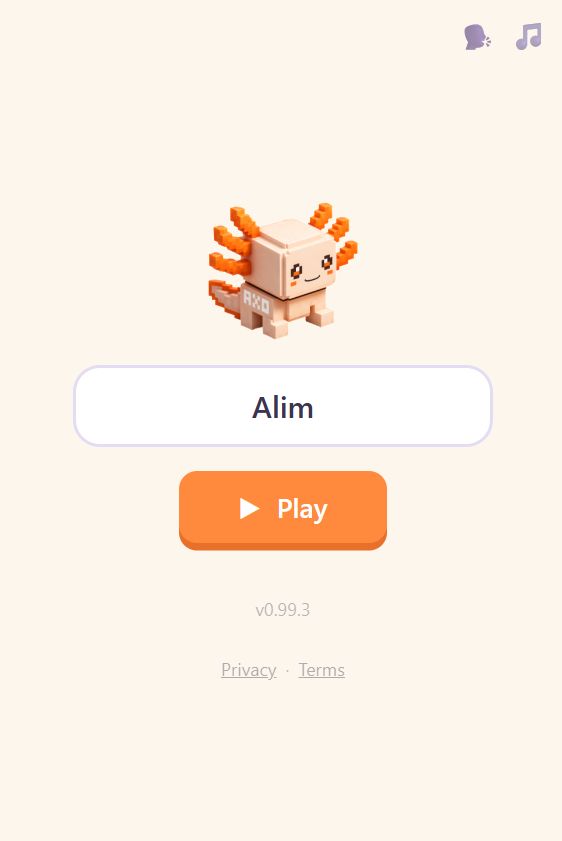
Начальный экран axo: аксолотль, поле для имени и кнопка «Играть». Скриншот начального экрана
(media/screenshots/01-home.jpeg)
  1. Аксолотль axo – талисман игры.
  2. Поле для имени. Только имя, ничего больше – оно нужно, чтобы игра здоровалась с ребёнком и хранила его результаты на этом устройстве.
  3. Кнопка «Играть». С неё начинается всё.
  4. Два переключателя звука: 🗣 голос, который произносит слова, и 🎵 фоновая музыка. Каждый выключается отдельно и остаётся выключенным.
  5. Номер версии и ссылки «Конфиденциальность · Условия».

Выбор героя

Ребёнок выбирает животное, которым будет играть. В начале открыты трое: медведь, хомяк и кролик.
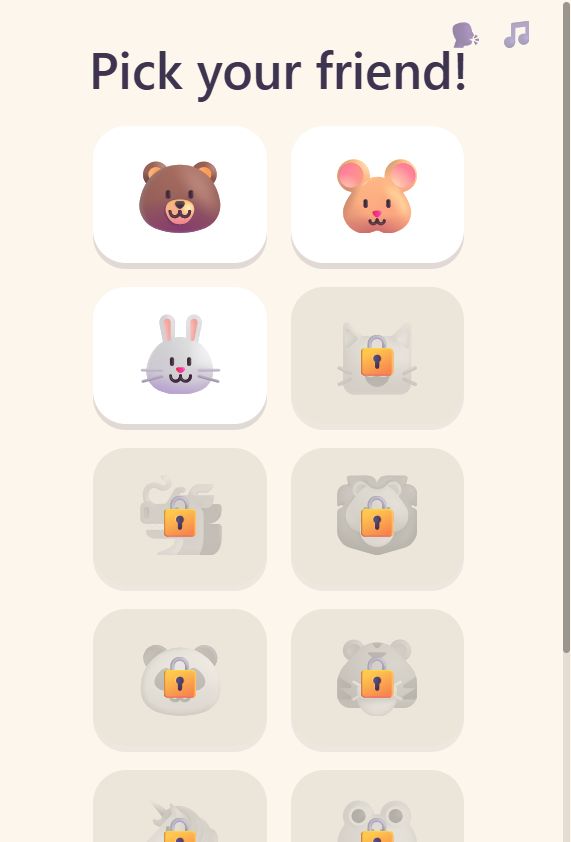
Экран выбора героя: медведь, хомяк и кролик открыты, остальные под замком. Скриншот выбора героя
(media/screenshots/02-animal.jpeg)
  1. Заголовок по-английски: «Pick your friend!». Интерфейс игры английский с первого экрана – на родной язык переводятся только подсказки.
  2. Три открытых героя: медведь, хомяк и кролик. Выбор ни на что не влияет в игре – это просто «мой персонаж».
  3. Закрытые герои под замком. Каждый открывается, когда ребёнок проходит определённый уровень. Это и есть награда за пройденный уровень.

Выбор героя появляется каждый раз, когда ребёнок начинает игру заново – многим детям это нравится больше, чем сам уровень.

Карта мира

Весь путь на одном экране, без прокрутки. Четыре острова – четыре этапа игры.
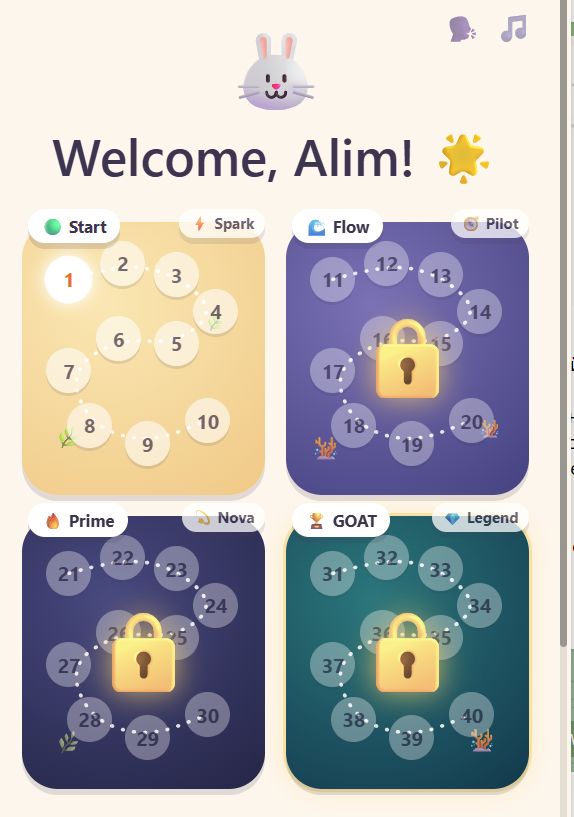
Карта мира axo: четыре острова-зоны с пронумерованными точками уровней. Скриншот карты мира
(media/screenshots/03-map.jpeg)
  1. Игра здоровается с ребёнком по имени, рядом – выбранный герой.
  2. Светящаяся точка – текущий уровень. Пройденные отмечаются галочкой, остальные просто пронумерованы. На каждом острове десять уровней.
  3. Значок острова, здесь «Spark». Ребёнок получает его, когда проходит остров целиком, и оставляет себе навсегда.
  4. Замок на закрытом острове. Откроется, когда ребёнок дойдёт до него. Замок здесь как обещание, а не как преграда: нажимать на него не нужно.
  5. Четыре острова – весь путь целиком: Start, Flow, Prime и GOAT, сорок уровней.

Ниже карты – большая кнопка «Let's go!». Она всегда продолжает с того места, где ребёнок остановился.

На карту можно вернуться в любой момент по значку карты в углу экрана. Нажатие на уже пройденный уровень открывает его заново – прогресс и рекорды при этом сохраняются.

Знакомство со словом

Перед каждым уровнем – карточка нового слова. Это и есть момент, когда английское слово входит в игру.
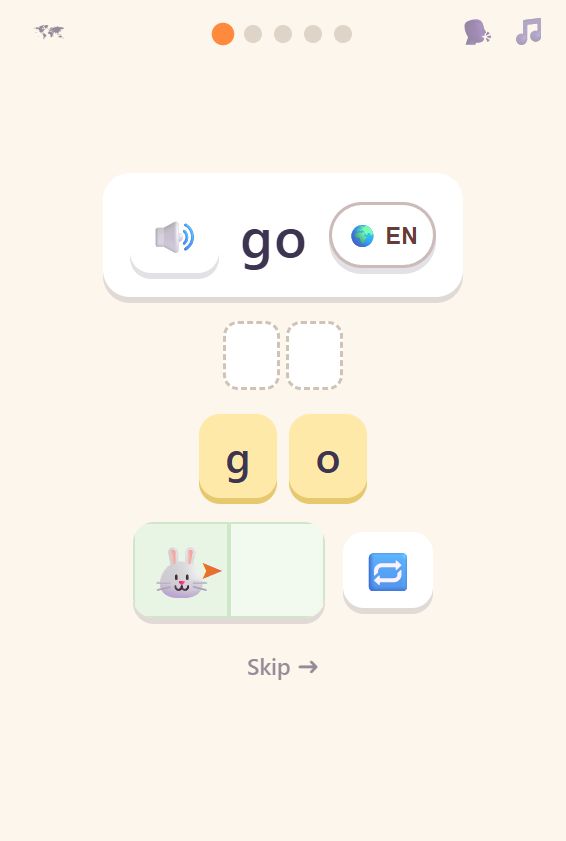
Карточка слова go: значок звука, кнопка языка, буквы для набора и полоска с героем. Скриншот карточки слова
(media/screenshots/04-learn.jpeg)
  1. Само слово, крупно и по-английски. Здесь это go – «иди».
  2. Значок звука. Нажатие произносит слово вслух. Слово звучит и само, когда карточка открывается.
  3. Кнопка «🌍 EN» – язык подсказок, 11 языков на выбор. Здесь же открывается перевод слова: он доступен по нажатию, но не показывается сам, чтобы ребёнок сначала попробовал понять слово через действие.
  4. Буквы и пустые клетки над ними. На этом экране слово набирается нажатием на буквы, а не с клавиатуры: слово ещё совсем новое.
  5. Полоска с героем. Как только слово собрано, герой сразу выполняет действие – ребёнок видит, что слово значит. Кнопка справа повторяет показ.

Точки наверху показывают, сколько шагов в уровне и на каком ребёнок сейчас. Значок карты в левом углу возвращает к карте мира, «Skip» пропускает шаг.

Первое задание

Здесь ребёнок уже сам набирает команды и составляет из них программу.
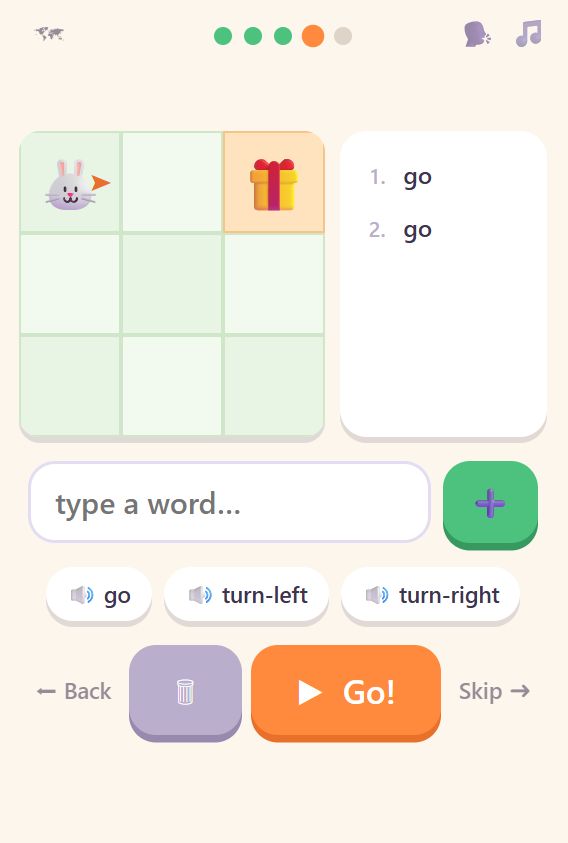
Экран задания: игровое поле с подарком, список набранных команд и кнопка «Go!». Скриншот первого задания
(media/screenshots/05-challenge.jpeg)
  1. Игровое поле. Оранжевая стрелка у героя показывает, куда он смотрит – это и решает, куда его поведёт команда go.
  2. Цель. Это всегда предмет – подарок, мяч, сундук. К нему и нужно привести героя.
  3. Программа – команды, набранные ребёнком, одна под другой и пронумерованные. Когда программа запускается, выполняемая строка подсвечивается вместе с движением героя.
  4. Поле ввода. Ребёнок печатает команду сам, с обычной клавиатуры, и добавляет её в программу зелёной кнопкой.
  5. Подсказки-слова со значком звука. Нажатие вставляет слово и произносит его. Это помощь по запросу: ребёнок сам решает, когда она нужна.
  6. «Go!» запускает программу. Рядом – корзина, чтобы стереть набранное, а по краям «Back» и «Skip».

Ошибиться здесь нельзя. Если команда неверная, герой просто не идёт дальше, и можно попробовать снова. В игре нет проигрыша, таймеров и штрафов.

Что дальше

Игра бесплатная и открывается в Telegram через бота @axocoder_bot. А в AXO Lab есть инструкции и ответы на вопросы.

«Играть бесплатно» откроет бота @axocoder_bot, «Присоединяйтесь к AXO Lab» – наш канал в Telegram.

← На главную

How to play axo

The five screens your child meets at the start. Look through them once, and they can take it from there.

👆 Tap any number on a picture and its note lights up in the list below it.

The start screen

The first thing that opens. Your child types their name and taps Play.

The axo start screen: the axolotl, a name field and a Play button. Start screen screenshot
(media/screenshots/01-home.jpeg)
  1. Axo the axolotl – the mascot of the game.
  2. The name field. A first name and nothing else – it lets the game greet your child and keep their results on this device.
  3. The Play button. Everything starts here.
  4. Two sound switches: 🗣 the voice that speaks the words, and 🎵 the background music. Each turns off separately and stays off.
  5. The version number and the Privacy · Terms links.

Choosing a hero

Your child picks the animal they will play as. Three are open at the start: bear, hamster and rabbit.

The hero picker: bear, hamster and rabbit open, the rest behind padlocks. Hero picker screenshot
(media/screenshots/02-animal.jpeg)
  1. The heading is in English: "Pick your friend!". The game's interface is English from the very first screen – only the hints are translated.
  2. The three heroes open at the start: bear, hamster and rabbit. The choice changes nothing in play – it is simply "my character".
  3. Locked heroes behind padlocks. Each one opens when your child finishes a particular level. This is the reward for finishing it.

The hero picker comes back every time your child starts the game over – for many children this is the favourite part.

The world map

The whole journey on one screen, with no scrolling. Four islands – four stages of the game.

The axo world map: four island zones with numbered level dots. World map screenshot
(media/screenshots/03-map.jpeg)
  1. The game greets your child by name, with their chosen hero beside it.
  2. The glowing dot is the current level. Finished ones carry a tick, the rest are simply numbered. Each island holds ten levels.
  3. The island badge, here "Spark". Your child earns it by finishing the whole island, and keeps it for good.
  4. The padlock on a closed island. It opens when your child reaches it. The lock is a promise rather than a barrier – there is nothing to tap on it.
  5. Four islands – the whole journey: Start, Flow, Prime and GOAT, forty levels.

Below the map is the big Let's go button. It always continues from wherever your child stopped.

The map is one tap away at any time via the map icon in the corner. Tapping a level that is already finished opens it again, and both progress and best times are kept.

Meeting a word

Every level opens with a card for the new word. This is the moment the English word enters the game.

The word card for go: a sound icon, the language button, letter tiles and a strip with the hero. Word card screenshot
(media/screenshots/04-learn.jpeg)
  1. The word itself, large and in English. Here it is go.
  2. The sound icon. Tapping it says the word aloud. The word is also spoken on its own when the card opens.
  3. The "🌍 EN" button – the language of the hints, eleven to choose from. The translation of the word lives here too: one tap away, but never shown by default, so your child first tries to catch the word through the action.
  4. The letters, and the empty slots above them. On this screen the word is tapped out letter by letter rather than typed, because the word is still brand new.
  5. The strip with the hero. The moment the word is complete, the hero performs the action – your child sees what the word means. The button to the right replays it.

The dots along the top show how many steps the level has and which one your child is on. The map icon in the left corner returns to the world map, and Skip moves past a step.

The first challenge

Here your child types the commands themselves and builds them into a program.

A challenge screen: the grid with a gift box, the list of typed commands and the Go button. First challenge screenshot
(media/screenshots/05-challenge.jpeg)
  1. The grid. The orange arrow by the hero shows which way they are facing – and that is what decides where the command go takes them.
  2. The goal. It is always an object – a gift box, a ball, a chest. That is where the hero has to end up.
  3. The program: the commands your child typed, numbered one under another. When it runs, the line being carried out lights up in step with the hero.
  4. The input field. Your child types each command themselves on the ordinary keyboard, then adds it to the program with the green button.
  5. Word hints with a sound icon. Tapping one inserts the word and says it aloud. This is help on request: your child decides when they need it.
  6. Go runs the program. Next to it is the bin for clearing the lines, with Back and Skip at either end.

There is no way to lose here. If a command is wrong, the hero simply does not move on and your child can try again. The game has no game over, no timers and no penalties.

What next

The game is free and opens in Telegram through the bot @axocoder_bot. AXO Global has the instructions and answers to questions.

Play for free opens the bot @axocoder_bot; Join AXO Global opens our English channel on Telegram.

← Back to home